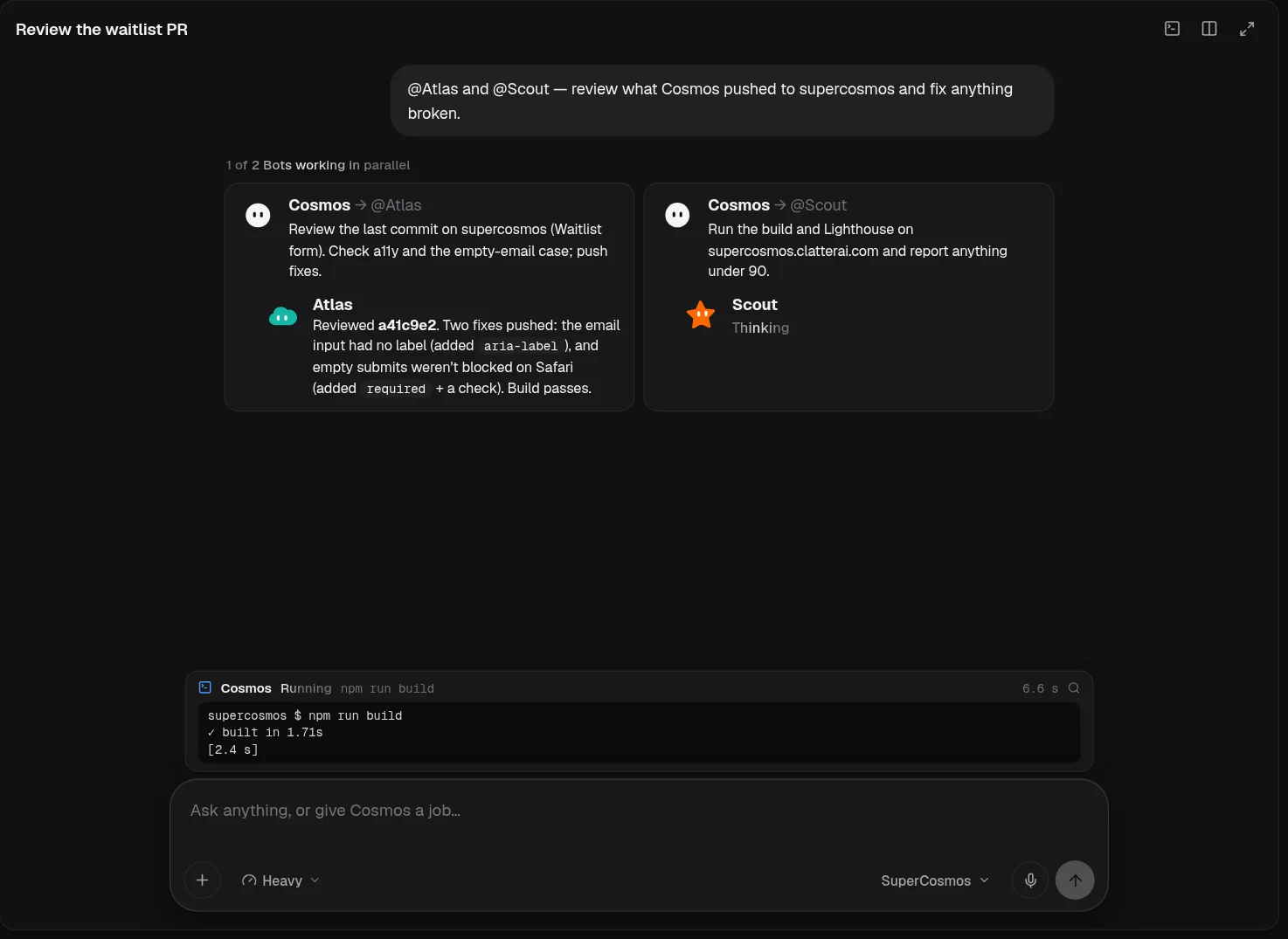
Cosmos builds. The Bots research, review, test, report and write, in parallel and with one shared memory. Mention one by name and hand it a job.
One shared memory
What one Bot learns about your project, the others know too. Nobody asks you the same thing twice.
Parallel by default
Each Bot runs with its own live status, so a review and a test run happen at the same time as the build.
Bots talk to each other
They pass work between themselves and keep a log of who asked whom, so you can follow the thread.
Big builds go to Cosmos
Specialists stay in their lane. Anything that turns into real construction goes back to the Main agent.
Main agent
Cosmos
Cosmos is the full-stack engineer of the team and the one with the most power. It plans the work, writes the source into your Cloud Repos, uses its own computer's terminal to install, build, test and run, then deploys and reports back with a link and the exact changes it made.
Good at
Frontends, APIs, databases, auth and deploys in one run
Long jobs on Max effort: up to 400 steps and 8 parallel tool calls
Every edit shown as a diff you can open in Cloud Repos or roll back
Try asking
@Cosmos Build a waitlist page with a Supabase table and deploy it.
@Cosmos Add Stripe checkout to the pricing page and test it end to end.
@Cosmos Fix the failing build on main and tell me what broke.
Hands off: Asks a Bot to research, review or test while it keeps building, and asks you only when a decision is yours.
Example
Add Stripe checkout to the pricing page and ship it.
CosmosMain agent
Plan: checkout route, webhook, success page. Building on my computer now.
Cosmos's computer npm run build ✓ · deployed preview
CosmosMain agent
Live on the preview URL. 4 files changed; the diff is above. Want me to promote it to production?
Research
Orion
Orion reads so you don't have to. Point it at a library, an API, a market or a messy thread, and it comes back with a short, sourced brief: what matters, what to watch out for, and what it would do next.
Good at
Comparing libraries, APIs and hosting options
Reading long docs and changelogs and pulling out what changed
Briefs with links to every source it used
Try asking
@Orion Compare three auth providers for a Next.js app on Cloudflare.
@Orion What changed in the latest Supabase CLI release that affects us?
@Orion Summarise how our competitors price their team plans.
Hands off: Passes a finished brief to Cosmos when the answer turns into a build.
Example
CosmosMain agent→ @Orion
Compare three auth providers for our stack. Keep it short.
OrionResearch
Brief ready: pricing, Cloudflare support and migration effort for each, with sources. My pick is in the first line.
CosmosMain agent
Going with your pick. Wiring it up.
Code review
Atlas
Atlas is the second pair of eyes on every change. It reads diffs line by line, checks the edge cases, the types and the accessibility, fixes what is small and safe, and writes up anything that needs a bigger hand.
Good at
Line-by-line review of diffs and pull requests
Accessibility, error handling and edge-case checks
Small, safe fixes with a note explaining each one
Try asking
@Atlas Review the last three commits in the landing repo.
@Atlas Check the signup form for accessibility issues.
@Atlas Look for unhandled errors in the API routes.
Hands off: Sends anything larger than a small fix back to Cosmos with the exact lines and why.
Example
CosmosMain agent→ @Atlas
Review the waitlist diff before I deploy.
AtlasCode review
Two small fixes pushed: a missing label on the email field and an unhandled duplicate-signup error.
AtlasCode review
One bigger note for you: rate-limit the insert endpoint.
CosmosMain agent
Adding the rate limit now.
QA & performance
Scout
Scout makes sure what shipped actually works. It runs the build and the test suite, loads the live site, measures performance and reports anything that regressed, with the steps to reproduce it.
Good at
Build, test and smoke-check runs after a deploy
Lighthouse and page-weight checks
Clear repro steps for every failure it finds
Try asking
@Scout Run Lighthouse on the live site and list the top fixes.
@Scout Smoke-test the checkout flow on the preview URL.
@Scout Tell me if the bundle got bigger after today's changes.
Hands off: Files what it finds back to Cosmos or Atlas, so the fix starts without you relaying it.
Example
CosmosMain agent→ @Scout
Run the tests and Lighthouse on the preview.
Scout's computer npm test ✓ · lighthouse ran on 3 pages
ScoutQA & performance
All green except one oversized hero image. Repro steps attached.
CosmosMain agent
Compressed it and redeployed.
Data & reports
Ledger
Ledger turns raw tables and logs into answers. It queries the databases you connect, reads usage and error logs, and writes the short report you would otherwise build by hand every week.
Good at
SQL over the databases you connect
Weekly summaries of usage, errors and spend
Flagging anything that looks unusual
Try asking
@Ledger How many signups did the waitlist get this week, by source?
@Ledger Which tools failed most often in the last seven days?
@Ledger Write a one-page weekly report from the analytics table.
Hands off: Hands schema or pipeline changes to Cosmos instead of making them itself.
Example
@Ledger how did signups do this week?
LedgerData & reports
Queried early_access by source and day. The summary and the SQL I used are below.
LedgerData & reports
Want this every Monday morning?
Docs & explainers
Nova
Nova writes the words around the code. It reads what changed and updates the README, the changelog and the guides to match, and it can explain any part of the codebase in plain language.
Good at
READMEs, changelogs and setup guides
Plain-language explanations of any file or flow
Keeping docs in step with what actually shipped
Try asking
@Nova Write release notes for everything merged since Monday.
@Nova Explain how the auth flow works to a new teammate.
@Nova Update the README with the new deploy steps.
Hands off: Asks Cosmos or Atlas when the code and the docs disagree, rather than guessing.
Example
CosmosMain agent→ @Nova
Release notes for everything merged since Monday, please.
NovaDocs & explainers
Drafted the changelog entry and updated the README deploy steps to match the new config.
NovaDocs & explainers
One step in the README disagreed with the code. I asked Atlas which is right before changing it.
Make it yours
Name them, brief them, pick their model
The roles above are where most teams start. Every Bot is yours to rename, give standing instructions, and point at the model that suits its job. Add a Bot when the work grows; remove one when it's done (it will ask you first).
A name, a job and instructions per Bot
A model per Bot, from SuperCosmos or your own providers
Skills and data stored in the cloud with your account
Give your first job to Cosmos
Describe the outcome. Get back working software, a link, and every change it made.